All posts by Pauline Barmby

Physics apps for your favorite device

The Institute of Physics in the UK gives us their guide to cool physics apps:


With 15 million to choose from, smartphone users are spoilt for choice. Here’s our pick of the best physics apps, from the practical to the weird and wonderful.

If we’ve left out your favourite physics app, why not tell us?


LHSee

Here’s one for all you armchair particle physicists. Find out all about the ATLAS detector, have a go at spotting the Higgs, and best of all, download particle collisions live from CERN. You can then explore particle tracks inside ATLAS  in full 3D glory – even if (like us) you don’t really know what’s going on, you have to admit it looks pretty cool.

Available on Android. Free.


Launchball

The Science Museum’s infuriatingly addictive game has gone mobile. A variation on the classic ‘get the ball into the goal’ puzzle, Launchball requires you to play with fire, electricity and magnetism as you progress through its levels. You can even build your own fiendishly difficult levels or try out other players’ creations.

Available on iPhone. Cost: around £0.70.


Google Sky Map

Stargazing is great, but it’s even better when you know what you’re looking at. Google Sky Map tells you just that – simply point your phone at the heavens and a map of the sky based on your location springs up, complete with stars, constellations planets and satellites. You could even point it at your feet to take a peek at what astronomers on the other side of the world can see.

Available on Android. Free.

(A similar app for iPhone and iPad users is Star Walk)


Solar System for iPad

Ever wanted to zoom in on Jupiter’s Great Red Spot or soar along a Martian canyon? This app provides a visually stunning tour of our solar system’s planets, moons and other celestial bodies. Packed with great stories, facts, beautiful imagery and plenty of other treats.

Available on iPad. Cost: around £9.99.
Solar System has also been released as a book, available on Amazon.


Wolfram alpha

This app is an intelligent reference guide to just about everything. Use it to find facts and formulae, perform calculations, plot graphs, get info about space probes and much more. There’s a good pinch of humour in there too – just try asking for the meaning of life or why the chicken crossed the road.

Available on Android, iPhone and iPad. Cost: around £1.50.
Also available free as a website.


Navigate to…


<< Back      Home >>

Let us know what you think of these pages – take our quick and easy survey.


Share:

The folowing links are external



Those lazy profs

Back in the fall of 2010, when it looked like members of UWOFA might be going on strike, there was occasionally some muttering about “those lazy profs who only work 3 hours a week”. It’s true that our actual classroom time is small compared to elementary or high school teachers, so what does a prof do with the other hours in the week?

Most professors at Western have their workloads divided between teaching, research and service. The balance varies, but the standard is 40% of time to research, 40% to teaching and 20% to service. So that tells you where some of the non-classroom time is going — to things completely other than teaching.

But how about the other non-classroom-but-teaching hours? From my perspective, some of those hours are spent doing the same things other teachers do:  preparing class activities (including lectures), preparing and marking assignments and tests, and dealing with a gradebook. I write letters of recommendation for students and meet with them in my office to talk about coursework or (espeically in the case of graduate students) their research. I go to conferences and workshops which are supposed to help me be a better teacher.

There are some things that elementary and high school teachers do which are not part of my job. I don’t have yard duty at recess, and, except in rare cases, I don’t talk to the parents of my students. However, I also do some things that elementary or high school teachers don’t do. (Let me be clear that I don’t think their jobs are easier than mine, just different!)

Some of these tasks are related to the size of our classes: for instance, this term I have one class with 100 students and one with 200; I’m course coordinator of two courses which means that I have some organizational responsibility for about 900 students total. With large classes, we have teaching assistants to help with things like tutorials and marking, and organizing those TAs is a non-trivial task. With that many students, administrating them — for example, arranging make-up exams for students who missed a midterm — also takes time. I have to make up many-page course outlines which spell out the details of my courses, such as what happens if a student misses a midterm. And a sad fact of life is that I have to spend time on anti-cheating measures, for example making multiple versions of exams.

The other category of teaching tasks that I think is different for profs is related to our greater freedom to decide what and how we want to teach. For elementary and high school students in Ontario, the province sets the curriculum. We have the Western course Calendar which doesn’t exactly go into the same level of detail. So I spend a fair bit of time thinking about what I want my students to learn, and why. For, say, first-year physics, this course content is driven to a large extent by the upper-level courses which these students will go on to take. But for a graduate course, or an astronomy-for-non-scientists course,  there’s not such a clear set of requirements.

This means that I spend time looking around for examples of similar courses, looking at textbooks to see which ones might be most suitable, and talking to other profs about what they want students to learn from this course. Then once I figure out where I want students to go, I have to figure out how I can help them to get there. Again, I spend some time looking around, trying to figure out what educational methods are best suited for the type of course and students that I have. If I give complicated assignments, I try to do them myself to make sure they’re feasible. If I’m going to use some new technology, I have to make sure that I can make it work.

My prof colleagues who are reading this now know exactly how lazy I am (or not). For students who read this all the way down, I hope it gives you a bit of a behind-the-scenes look at what I am doing when we’re not in the classroom together. In a future post I’ll discuss some of what the other 60% of my time involves.

Astronomy apps for your new mobile device

Just in time for the holidays, an annotated overview of 98 astronomy applications for smart phones and tablets has been published in the on-line journal “Astronomy Education Review.”  Compiled by Andrew Fraknoi (Foothill College), the list features a brief description and a direct URL for each app.

You can access the article free of charge at:
http://aer.aas.org/resource/1/aerscz/v10/i1/p010302_s1

The listing includes a variety of apps for displaying and explaining the sky above you (some using the GPS function in your device); a series of astronomical clocks, calculators, and calendars; sky catalogs and observing planners; planet atlases and globes; citizens science tools and image displays; a directory of astronomy clubs in the U.S.; and even a graphic simulator for making galaxies collide. A number of the apps are free, and others cost just a dollar or two. A brief list of articles featuring astronomy app reviews is also included.

Astronomy Education Review is on-line journal about astronomy education and outreach — published by the American Astronomical Society — which celebrated its 10th anniversary this fall.  You can find it at http://aer.aas.org

Science podcasts

I listen to a lot of podcasts. When I lived in Boston, I had a tortuous commute. Now that I live in suburban London, my commute isn’t so bad but I have a lawn to be mowed and a driveway to be shovelled.  Here are a few science-related podcasts that I like. These are primarily “professional” podcasts; amateur ones to be covered in some future post.

Quirks and Quarks from the CBC

Science Weekly from the Guardian

Nature podcast  from (you guessed it) Nature

Science Talk from Scientific American

The Naked Scientists from “a media-savvy group of physicians and researchers from Cambridge University”

The Jodcast from the Jodrell Bank Centre for Astrophysics

Material World from the BBC

Science Times from the New York Times

An Electrifying Christmas Light Display, Courtesy of Nikola Tesla | Popular Science

By Clay DillowPosted 12.22.2009 at 1:11 pm

13 Comments


Merry ChristmasDr. Peter Terren

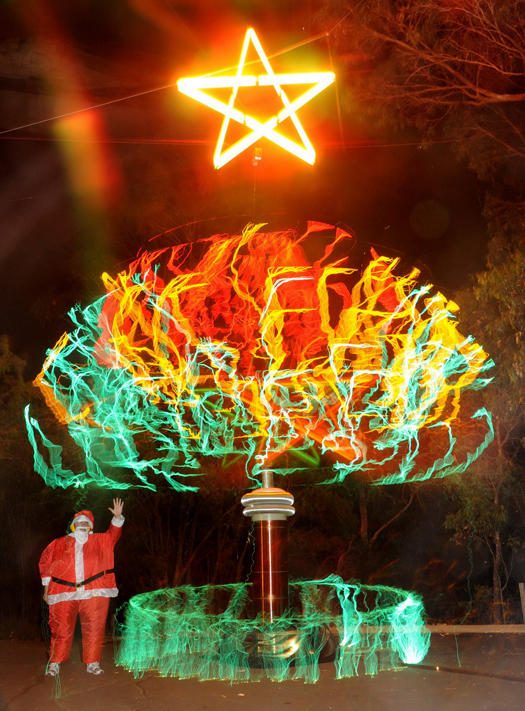
A physics fanatic down under is having a very Tesla Christmas this year, creating a 30-foot electrifying display of yuletide cheer by attaching a rotating rod to the top of a Tesla coil, making for quite the colorful Christmas tree. Using such specialized science tools as a fishing rod and sinker, household power, and a Nikon D300, physician and Tesla buff Peter Terren manipulated 500,000 volts at a time to produce the images seen here.

Using what he calls “electrickery,” Dr. Terren — known for a few other Tesla coil adventures including an electro-colorful remake of Rodin’s “Thinker” — used a really long exposure on his camera, several different lens filters and his knowledge of physics to create the high-voltage scene, manipulating the rod to create different visual effects.

Nothing in the images is Photoshopped, but someone watching Dr. Terren create the images would see something quite different than the image itself. Rather than a fiery display of colorful plumage, a passerby would see two minutes of intense sparking at the coil while Dr. Terren scrambled about switching filters on the camera from green to yellow to red and so on while gradually raising the rod atop the Tesla coil. But when the camera shutter finally snaps shut 120 seconds later, what’s captured is the bright white light, filtered into Christmas wavelengths.

A Discovery Channel segment about Dr. Terren’s tree is in the works, but you can catch more images in our accompanying gallery, and find pics of his creative process here.

[Tesla Down Under, WA Today]